摘要:结局每隔一段时间就会到来,我经历它,就像飞机穿过云层。 —露易丝·格丽克-
组件描述
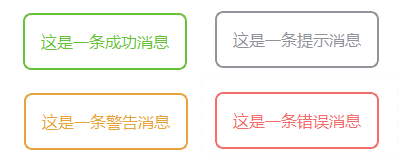
一个用于消息提示的弹窗,无交互作用,展示3s后自动消失,仅用于提示作用
使用工具: Pyside2,继承自QDialog
主要代码
class AutoMessageBox(QDialog):
    def __init__(self, message="这是一个自动消失的消息",
                 type_="info", parent=None, duration=3000):
        """
        :param message: 消息内容
        :param type_: 消息类型
        :param parent: 父组件,默认为None
        :param duration: 存在时间
        """
        super().__init__(parent)
        self.setWindowModality(Qt.NonModal)  # 非模态对话框
        self.setWindowFlags(Qt.FramelessWindowHint | Qt.Dialog | Qt.WindowStaysOnTopHint)
        self.setAttribute(Qt.WA_TranslucentBackground)

        # 设置窗口属性
        self.message = message
        self.type = type_
        self.duration = duration  # 显示持续时间(毫秒)

        # 初始化UI
        self.init_ui()

        # 添加动画效果
        self.setup_animations()

        # 设置自动关闭计时器
        self.timer = QTimer(self)
        self.timer.timeout.connect(self.hide_with_animation)

    def init_ui(self):
        # 主题色
        if self.type == "success":
            theme_color = "#67C23A"
        elif self.type == "warning":
            theme_color = "#E6A23C"
        elif self.type == "error":
            theme_color = "#F56C6C"
        else:  # info
            theme_color = "#909399"
        # 主布局
        main_layout = QVBoxLayout()
        main_layout.setSpacing(0)
        main_layout.setContentsMargins(0, 0, 0, 0)

        # 创建内容面板
        content_widget = QFrame()
        content_widget.setObjectName("content")
        content_widget.setStyleSheet(f"""
            #content {
                background: #fff;
                border-radius: 8px;
                box-shadow: 0 4px 12px rgba(0, 0, 0, 0.15);
                padding: 16px;
                border: 2px solid theme_color;
            }
        """)
        # 内容布局
        content_layout = QVBoxLayout(content_widget)
        content_layout.setSpacing(12)
        content_layout.setContentsMargins(0, 0, 0, 0)

        # 消息内容
        message_label = QLabel(self.message)
        message_label.setObjectName("message")
        message_label.setWordWrap(True)
        message_label.setFont(QFont("Microsoft YaHei", 12))
        message_label.setAlignment(Qt.AlignTop | Qt.AlignLeft)
        message_label.setStyleSheet(f"#message{color:theme_color}")

        # 添加到内容布局
        content_layout.addWidget(message_label)

        # 添加到主布局
        main_layout.addWidget(content_widget)
        self.setLayout(main_layout)

        # 计算合适大小
        self.adjustSize()
        self.setFixedSize(self.sizeHint())

    def setup_animations(self):
        # 淡入淡出动画
        self.setWindowOpacity(0)

        self.fade_in = QPropertyAnimation(self, b"windowOpacity")
        self.fade_in.setDuration(300)
        self.fade_in.setStartValue(0)
        self.fade_in.setEndValue(1)
        self.fade_in.setEasingCurve(QEasingCurve.OutQuad)

        self.fade_out = QPropertyAnimation(self, b"windowOpacity")
        self.fade_out.setDuration(300)
        self.fade_out.setStartValue(1)
        self.fade_out.setEndValue(0)
        self.fade_out.setEasingCurve(QEasingCurve.InQuad)

        # 移动动画
        self.move_anim = QPropertyAnimation(self, b"pos")
        self.move_anim.setDuration(300)
        self.move_anim.setEasingCurve(QEasingCurve.OutBack)

        # 动画组
        self.show_anim_group = QSequentialAnimationGroup()
        self.show_anim_group.addAnimation(self.fade_in)
        self.show_anim_group.addAnimation(self.move_anim)

        self.hide_anim_group = QSequentialAnimationGroup()
        self.hide_anim_group.addAnimation(self.fade_out)

    def show(self):
        # 计算居中位置
        screen_geometry = QApplication.primaryScreen().geometry()
        center_point = QPoint(
            screen_geometry.center().x() - self.width() // 2,
            screen_geometry.center().y() - self.height() // 2
        )

        # 初始位置在屏幕中心下方
        start_point = QPoint(
            center_point.x(),
            center_point.y() + 30
        )

        self.move(start_point)
        self.move_anim.setEndValue(center_point)

        super().show()
        self.show_anim_group.start()

        # 启动计时器
        self.timer.start(self.duration)

    def hide_with_animation(self):
        self.timer.stop()
        self.hide_anim_group.start()
        # 等待动画完成后再真正关闭
        self.hide_anim_group.finished.connect(super().hide)

    @staticmethod
    def info(message, parent=None, duration=3000):
        return AutoMessageBox(message, type_="info", parent=parent, duration=duration)

    @staticmethod
    def success(message, parent=None, duration=3000):
        return AutoMessageBox(message, type_="success", parent=parent, duration=duration)

    @staticmethod
    def warning(message, parent=None, duration=3000):
        return AutoMessageBox(message, type_="warning", parent=parent, duration=duration)

    @staticmethod
    def error(message, parent=None, duration=3000):
        return AutoMessageBox(message, type_="error", parent=parent, duration=duration)
使用方式
    # 示例用法
    msg_box = AutoMessageBox.success(parent=self,message=message)
    msg_box.show()
成果展示